Home > Using PhotoTools 25 > Using the Masking Tools > Using the MaskingBug
Using the MaskingBug
| The MaskingBug is a fast way to create a mask that blends the current
effect. This allows you to quickly apply effects such as vignettes and
graduated filters in an adjustable, customizable shape and position.
The MaskingBug technology comes from FocalPoint and if you have ever
used it there it will be familar in PhotoTools 2.5 It appears as a
wireframe representation of an insect. It has a body, legs and
antennae. The MaskingBug gives you a fast and tactile way to control
the
most commonly used masking controls in PhotoTools 2.5. The MaskingBug
controls the
position, size and shape of the mask as well as the fade amount,
opacity and feather. Once you have played with the MaskingBug for a few minutes you will get the hang of using it. And it will become fast and intuitive for you to a use, just like adjusting a zoom lens on a camera. | 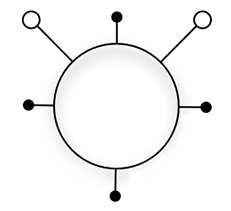 |
See also