Home > Using PhotoTools 25 > Using the Masking Tools
Using the Masking Tools
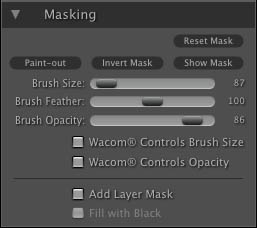
New in PhotoTools 2.5 is the ability to selectively apply each effect in the PhotoTools stack. Users can use the new Masking Brush to selectively apply each effect to the image. This opens a whole new world of control for PhotoTools 2.5 users. Using the Masking Brush is just like using a layer mask in Photoshop to hide or reveal the effect in specific, user-defined areas of the image. The Masking Brush even supports pressure-sensitive Wacom tablets for the ultimate in control. Each effect that you add to the Stack has a hidden mask already applied so you can grab the Masking Brush and paint-in or paint-out an effect on an effect-by-effect basis. |
 |
 |
The
Masking Brush requires a video card that supports OpenGL 2.0 or higher.
If PhotoTools detects that you have an incompatible video card it will
warn you on launch and when you add a Paint-In effect. You can learn more about supported video cards here. |
See also