Home > Using FocalPoint 2 > Menus > View
View
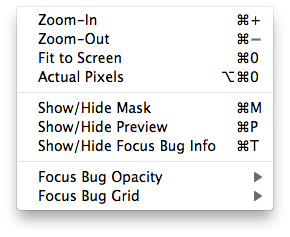
| Zoom In: Zooms the preview window in one increment. This will make the preview image larger. Zoom Out: Zooms the preview window out one increment. This will make the preview images smaller. Fit to Screen: This sets the preview image so that the entire image is on screen at once. Think of this as an overview of the entire image. This is the setting you will use most of the time. Actual Pixels: This sets the preview image so that it zooms to actual pixels or 1:1 also called 100%. This setting allows you to see every pixel in the image. This is useful when making precision adjustments. Show/Hide Mask: Toggles the visibility of the black and white mask, which is useful for seeing the shape of the FocusBugs as well as your FocusBrush strokes. Show/Hide Preview: Toggles the preview of the effect on and off. Useful for comparing the results to the original image. Show/Hide Focus Bug Info: Toggles the visibility of the text tool-tips and amount readouts on the FocusBug. FocusBug Opacity: Sets the opacity of the FocusBug control on screen. You can reduce its opacity if it interferes too much with the image. FocusBug Grid: Sets the mode of the FocusBug Grid; always on, always off, or automatic where it only appears when the FocusBug is being adjusted. |
 |
See also