Home > Using FocalPoint 2 > Menus > File
File
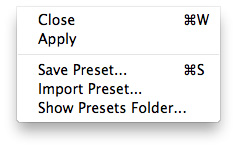
| Close: Cancels FocalPoint and returns back to the host application with no changes. Apply: Applies the current options to your image and returns to the host application. Save Preset...: Opens the save preset dialog where you can save the current options as a preset for future use or sharing. Import Preset...: Opens the import preset dialog where you can select and add presets to FocalPoint. Show Preset Folder...: Opens the FocalPoint preset folder in the Finder (Mac) or Explorer (Win). This folder contains the individual preset files. |
 |
See also