Home > Using PhotoTune > Using Pro Mode > Adjusting Tone
Adjusting Tone
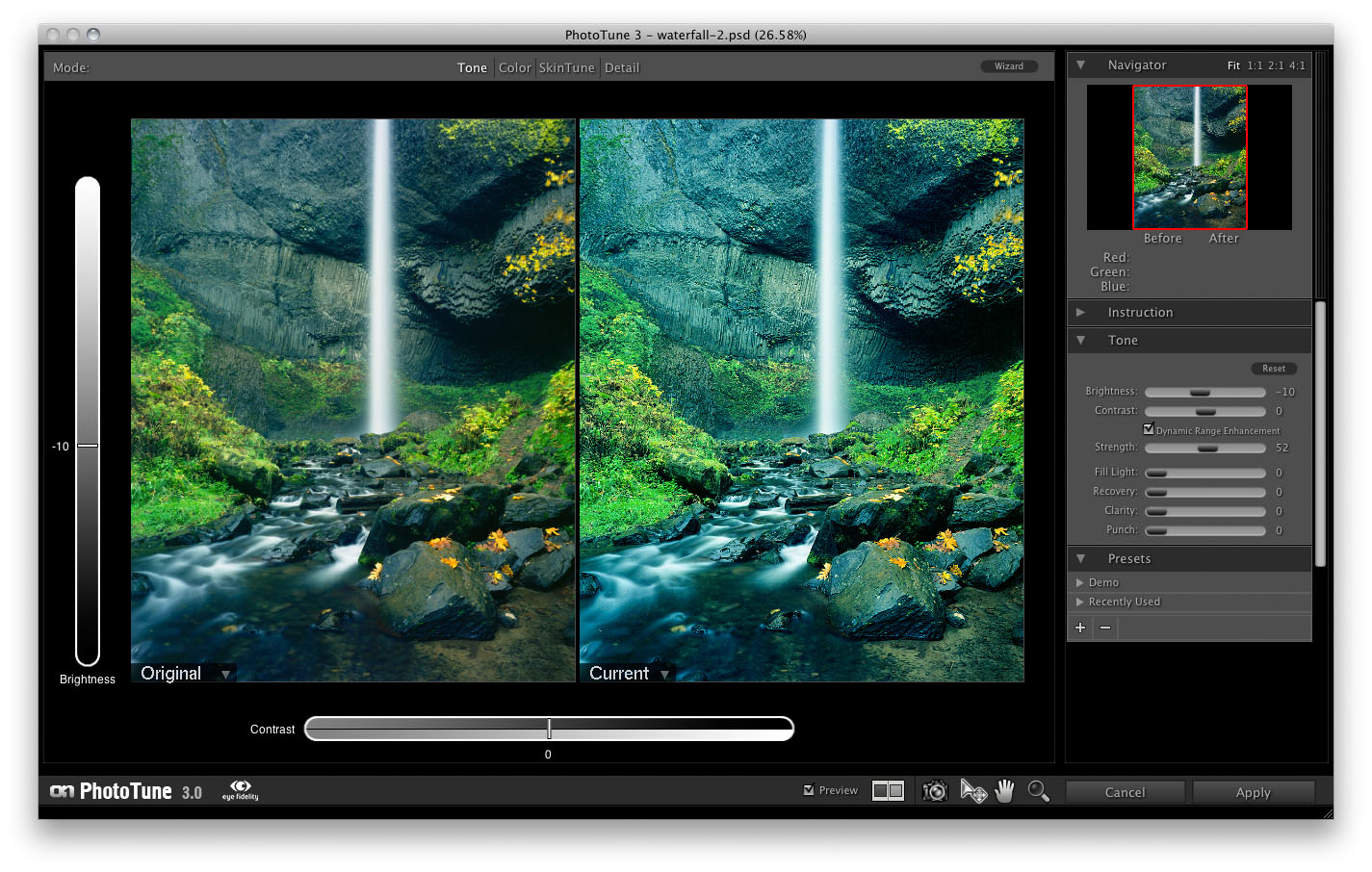
The Tone Mode of the Pro Interface is for adjusting the tonality of image. The tonality is made up of the dynamic range, the brightness and contrast of the image. The controls for Tone are located in the Tone pane. The controls are:
- Brightness: Controls the overall lightness or darkness of the image. You can adjust it with the slider in the Tone pane or just move the preview image up or down with the move tool. Its best to adjust the Dynamic Range Enhancement before adjusting the brightness.
- Contrast: Controls the overall contrast, or how strong the brightest and darkest tones in the image are. An image that lacks contrast will have little or no true whites or blacks. Contrast can be controlled in the Tone pane or by sliding the preview image left or right with the select tool. It is best to adjust the Dynamic Range Enhancement before adjusting the contrast.
- Dynamic Range Enhancement: Unique to PhotoTune 3, the Dynamic Range Enhancement slider adjusts the amount of tonal compression in the image. It will reveal information hidden in the shadows as well as adjust the global and local contrast of the image. Essentially it remaps the tones in the image to appear more true to life, like you saw when you pressed the shutter. High values of 50-90% are good for landscape images. Lower settings of 20-50% are ideal for portrait images. This is the first control to adjust when starting to work on your image.
- Fill Light: Fill light will help bring details out in the shadows. Generally only low amounts are required after using the Dynamic Range Enhancement.
- Recovery: Recovery reduces the lightness of the brightest whites in the image. This can be useful for reducing overexposed areas.
- Clarity: Clarity is used to increase local contrast which will make the image "pop" without sacrficing the highlight or shadow detail. Clarity only effects the tonal difference along edges in the image.
- Punch: Punch produces a similar look to clarity but also increases color saturation at the same time. A flat digital image will look more like it was photographed on film with a little extra punch.
 | onOne Software uses patented eye-fidelity TM technology, originally developed by and licensed from imsense. imsense has developed and patented breakthrough algorithms to solve the problem of Dynamic Range Correction in standard and HDR images. eye-fidelity renders images faithful to the image the eye saw. It ensures that detail is revealed whilst maintaining colour balance and integrity and the deliberate effects, such as region highlighting, employed by the photographer. eye-fidelity technology is unmatched for the speed, quality and versatility of its output. |
See also