Home > Using PhotoTools 25 > Batch Processing > Source Tab
Source Tab
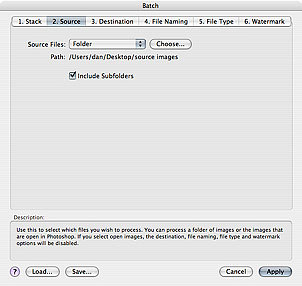
| The source tab helps you define which files to process. It has the option of the files currently open in Photoshop or a folder of images. If you select the files currently open in Photoshop, PhotoTools will apply the selected stack to all images open in Photoshop and leave them open upon completion. Please note when using this option that the destination, file naming and file type tabs are disabled. If you use the folder option you can define a folder on your computer, attached drive or network drive that contains the images you wish to process. Press the Choose... button to select the folder you wish to use. The path line confirms the location visually. There is a checkbox labeled "Include Subfolders", which will look inside the source folder for subfolders and files that they may contain. |
 |
See also