Home > Using PhotoTools 25 > Batch Processing > Stack Tab
Stack Tab
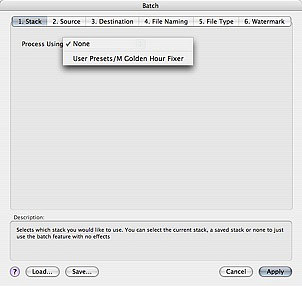
The Stack tab is the first (far left) tab of the batch dialog. Note that each tab is numbered in the order that they should be completed. The Stack tab allows you to select which stack preset you wish to process your files with. If you opened Batch directly from the onOne menu (or the automate menu) you have access to all of your saved presets as well as the none option. The None option allows you to use the features of the batch engine without adding any frames from PhotoTools. If you opened Batch from inside of PhotoTools you will see the Current Stack option available, which uses your current Effect Stack in PhotoTools. |
 |
See also