Home > Using PhotoFrame > Using the Library > Presets > Using Presets
Using Presets
You can load or apply a preset from several locations in PhotoFrame, first from the Preset tab of the Library you may press either the load or apply buttons at the bottom of the Library window.
- Load Preset: Clears the current Frame Stack and then loads the preset into it.
- Apply Preset: Clears the current Frame Stack and then loads the preset into it, then applies it and returns to the host application.
You can also apply presets directly from the onOne menu, the PhotFrame Batch dialog or the PhotoFrame for Photoshop Lightroom or PhotoFrame for Aperture dialogs.
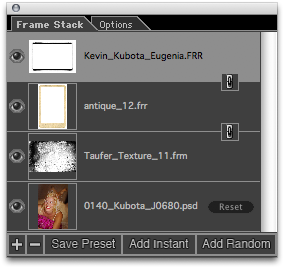
When you load a preset into the Frame Stack it will replace any elements already in it. It will also lock multiple elements together so you move and resize them together at once. You can identifly locked elements by the link icon between element layers. You can click on this icon to turn the link off between layers if you need to. |
 |
See also