Home > Using PhotoFrame > Menus > Frame
Frame

Note: The controls in the Frame menu apply to elements selected in the Frame Stack while working in the Preview window only. They do not control elements in the Library window.
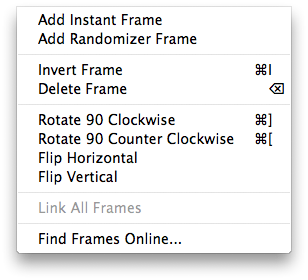
| Add Instant Frame: Adds an instant frame to the Frame Stack and opens the Instant Frame palette if it is closed. Add Randomizer Frame: Clears the current stack and adds a random group of frames and elements based on your preferences. Invert Frame: Inverts the current frame. This will make the inner area of the frame the background. Delete Frame: Removes the current frame from the stack. Rotate: The rotate commands rotate the current frame 90 degrees clockwise or counter clockwise. Flip: The flip commands will flip the frame either horizontally or vertically. Link All Frames: Links all the elements in the stack together, making it easier to move and reposition them together. Find Frames Online...: Opens your default web browser and navigates to the onOne Exchange where you can find additional frames and presets. |
 |
See also