Home > Using PhotoFrame > Batch Processing > File Naming Tab
File Naming Tab
| The file naming tab allows you to determine the name of new files created through batch processing. You are allowed to add up to six naming articles, or segments, consisting of the original file name, the date, serial number or custom text. |
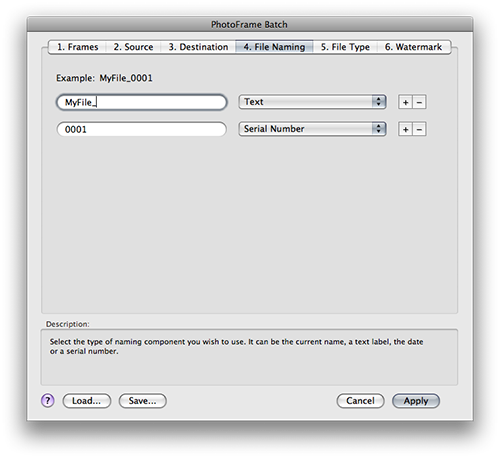 |
| Article | What is It? |
| Current Name | The original filename without the extension. PhotoFrame will always add the proper extension to the end of the filename. Example: DSC007 |
| Current Name and Extension | The original filename and extension. PhotoFrame will always add the proper extension to the end of the filename. Use this option if would like to add the original extension to the file name as well as the current extension. Example: DSC007.jpg |
| Text | A line of text of your choice up to 32 characters long. This could be a job or client name or anything you like. Example: whateverIwant |
| Serial Number | A numerical serial number. It may be up to eight digits long and supports leading zeros. You can specify any number to start with. Each file will be numbered sequentially starting with your first number. Example: 0001 |
| Date | Todays date in YYMMDD format. Example: 070926 |
Here are some examples of ways you can name your batch processed files.
Articles
Example
Text+Serial Number
myfile_001.jpg
Original Name+Text+Serial Number
DSC007_Johnson_001.jpg
Text+Date+Serial Number
myfile_070926_001.jpg
Original Name with Extension+Text
DSC007.CR2_Converted.jpg
See also