Home > Using PhotoFrame > Edge Palette
Edge Palette
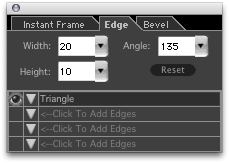
The Edge palette allows you to distort the edge of your element using one of eight pre-set distortion types:
- Wave
- Triangle
- Saw Teeth
- Saw Teeth (Reversed)
- Brush Strokes
- Random
- Diffuse
- Clean
You can combine different edge effects, up to four per element, and vary the height and frequency of the peaks.
- Angle: Allows you to change the angle of the edge effect, between 180° and -180°.
- Height: Allows you to change the depth or amplitude of the peaks in the edge effect. Uses a sliding scale from 1 to 50, where 1 is minimum effect and 50 is maximum effect.
- Width: Allows you to adjust the width, or frequency of the peaks in the distortion.
- Edge Visibility Button: Click to activate or deactivate this edge effect on the selected frame. Eye visible indicates that the edge effect is active.
- Edge Type Pop-up: Displays list of basic distortions from which to choose.
- Reset: Click to revert to the factory default settings for this palette.
|
 |
See also
|