Home > Using Genuine Fractals > Menus > View
View
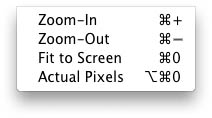
| Zoom In: Zooms the preview window in one increment. This will make the preview image larger. Zoom Out: Zooms the preview window out one increment. This will make the preview images smaller. Fit on Preview: This sets the preview image so that the entire image is on screen at once. Think of this as an overview of the entire image. This is the setting you will use most of the time. Actual Pixels: This sets the preview image so that it zooms to actual pixels or 1:1 also called 100%. This setting allows you to see every pixel in the image. This is useful when making adjustments to the Texture Controls, Sharpening or Film Grain. |
 |
See also