Home > Getting Started > Understanding Resolution
Understanding Resolution
| How Much Resolution Do I Need? That's a common question that we hear. To answer it you need to know two things:
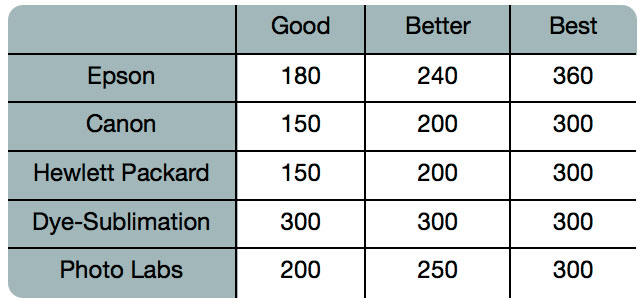
few, 4-12 ink colors to reproduce one square pixel in your image that could be any of millions of colors. A common mistake is to set the resolution of the file to the resolution of the printer. In all but a few special printers this will result in huge files that will not print well, if at all. The secret is that the human eye can not see much more than 250-300 pixels per inch. So the ideal resolution for your files should be close to this and be an even multiple of the printers resolution. Once you know the print size and resolution it is easy to use Genuine Fractals 5 to resize your file to the desired output. Simply input the resolution and then either the print width or height. You'll see that the corresponding dimension is automatically filled in by Genuine Fractals 5 based on the proportions of your image. Keep the proportions in mind because the proportions of films, digital camera sensors and papers can all be different. For example most digital cameras sensors are proportioned so that the height is two thirds the width or 1:1.5; While the most common paper size, in the US, is letter which is 8.5x11 inches or a about 1:1.25. These kinds of proportion mis-matches are common and require that the original image be cropped to fit the proportions of the paper size. If your image cannot be cropped without ruining the composition then you will need to adjust your print size to longer dimension. |
 |
Resizing an image larger than the original size requires that new pixels be created. This process is called interpolation or resampling. There are many mathematical ways, called algorithms, to do this. The most common method used by by many pixel editing applications is called bicubic interpolation. Bicubic along with with its newer variants bicubic smoother and bicubic sharper work by averaging a small group of neighboring pixels to determine the color value of the new pixels to be added. While this technique is fast, it does not distinguish edges so there is a uniform loss of sharpness and detail across the image. Genuine Fractals patented scaling algorithm is fundamentally different from bicubic or other interpolation methods. While these other methods sample nearby pixels and decide upon new pixel values one by one, fractal scaling samples nearby "blocks", square groups of pixels and varying sizes, compares them to smaller versions of the original image and mosaics these patches together to create a larger version of the original. By doing this repeatedly, many times the characteristics of the image like edges, smooth areas, and textures are reinforced for each larger version. Noise is de-emphasized and sharp details are maintained. All of this number crunching may take a bit longer than the single pass interpolation methods like bicubic, but good things come to those who wait and reward is far superior results. |
See also