Home > Using Genuine Fractals > Preferences
Preferences
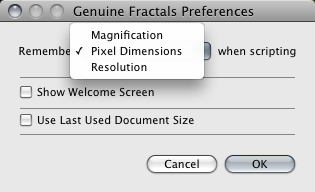
| The preferences dialog contains several settings that are remembered from session to session. They control the way certain features work in Genuine Fractals. When recording an action, Genuine Fractals will instruct Photoshop to remember either the pixel dimensions, document size or the resize scaling percentage. You can control which method is used by adjusting the Preferences in Genuine Fractals. The default is Pixel Dimensions. Show Welcome Dialog: When enabled, you will be greeted by the welcome dialog each time you start Genuine Fractals. Use Last Used Document Size: When enabled, Genuine Fractals will remember the last used scaling settings and adjust the image size for the next image you open in it. This was the standard behavior in Genuine Fractals 5. |
 |
See also