Home > Getting Started > User Interface
User Interface
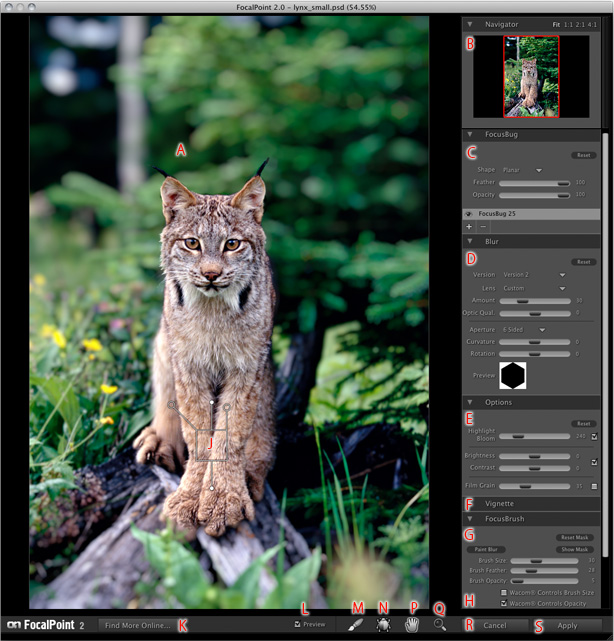
A - Preview Window: Shows your original image.
B - Navigator Pane: Displays an overview of the entire image along with a red box marketing the area displayed in teh preview window. Shows Allows you to zoom and pan the preview areas.
C - FocusBug Pane: The main control for FocalPoint, the FocusBug controls the size, position and shape of the sweet spot. The FocusBug's antennae adjust the controls from teh Aperture and Blur panes as well. Up to six FocusBugs can be placed on an image. Each FocusBug has its own settings.
D - Blur Pane: Contains the presets for lens types and the controls for the amount and optical quality of blur, as well as Aperture, curvature and rotation of the blur.
E - Options Pane: Contains the Highlight Bloom, Brightness, Contast and Film Grain controls.
F - Vignette Pane: Pictured in its closed state, contains the vignette brightness and midpoint controls.
G - FocusBrush Pane: Contains the FocusBrush controls such as brush mode, size, feather, opacity, etc. Also contains controls to view and reset the mask. Full pressure support for Wacom tablets is included.
H - Preset Pane: Not Pictured. Displays saved presets and contains the controls to add and remove presets.
J - FocusBug: The FocusBug is used to control the Sweet-Spot, or the area that does not get blurred.
K - Find More Online button: Click this button to go the the FocalPoint
online portal page containing free presets, tutorials, updates and news.
L - Preview on/off Toggle: Toggles the preview window on and off.
M - Brush Tool: Select this tool to selectively paint an effect in or out.
N - FocusBug Tool: Select this tool to adjust the FocusBug.
P - Hand (Pan) Tool: Select this tool to move the image within the preview window.
Q - Zoom (Magnify) Tool: Select this tool to change the size of the image in the preview window.
R - Cancel Button: Press this button to cancel FocalPoint and return to the host application.
S - Apply Button: Press this button to apply the current stack to your image and return to the host.
See also