Home > Using FocalPoint 2 > Blur Pane
Blur Pane
| The Blur pane contains the controls for adjusting the type, amount and appearance of the blur. These settings are global and effect the blur across the entire image and all of the FocusBugs share these settings. Reset: The Reset button resets all of the Blur pane settings to their defaults. Version: The version pop-up selects the type of blur, Version 1 from FocalPoint 1 and version 2, the new blur algorithm for FocalPoint 2. Lens: The lens pop-up contains settings that simulate popular lenses and their bokeh. | 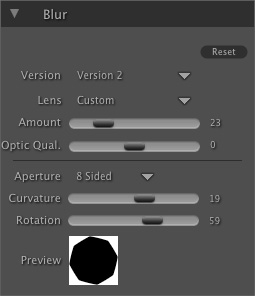 |
Amount: The amount slider is key, it controls the amount of blur for the image. The larger the amount, the softer the bokeh will appear and the larger the highlights will appear.
Optic Quality: This slider varies the density of the aperture.
Aperture: This pop-up sets the number of blades in the aperture. The larger the number of blades, the more round the aperture and the highlights in the bokeh.
Curvature: This slider sets the curvature of the aperture blades.
Rotation:This slider is used to rotate the shape of the aperture. Preview: This shows a graphical preview of the aperture shape. |













See also