Home > Using FocalPoint 2 > Using the Focus Brush
Using the Focus Brush 
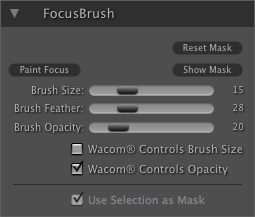
New in FocalPoint 2 is the ability to selectively apply the blur with the FocusBrush. Users can use the new FocusBrush to selectively paint in blur or sharpness. This opens a whole new world of control for FocalPoint 2 users. Using the FocusBrush is similar using a layer mask in Photoshop to hide or reveal the blur in specific, user-defined areas of the image. You can use the FocusBrush to alter the shape of the mask created by a FocusBug or from scratch to paint focus just where you want. The FocusBrush even supports pressure-sensitive Wacom tablets for the ultimate in control. |
 |
See also