Home > Using FocalPoint 2 > Options Pane
Options Pane
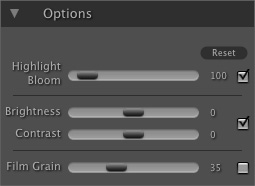
The Options pane contains additional controls for adjusting the appearance of the blur. These options are global and effect the entire blurred region. Highlight Bloom: The highlight bloom increases the brightness of highlights in the bokeh. It will also increase the number and strength of aperture shapes in the bokeh. Usually a setting between 100-300 works well.
Brightness and Contrast: The brightness and contrast sliders allow you a quick way to either brighten, darken or alter the contrast in the blurred region.
Film Grain: Contains the amount slider for adding Film Grain, or noise to the bokeh. Adding Film Grain can replace grain lost in the bokeh during the blurring process maintaining a realistic image. It is also useful to prevent posterization during printing. To toggle the Film Grain effect on and off use the toggle to the right side. Be sure to zoom into 1:1 (100%) when adjusting the amount. |
 |




See also